Gergely Orosz, who writes The Pragmatic Engineer, described an integration that watches a Google Sheet and adds a paid subscriber to his newsletter when a row changes. It costs him about $200 a year on Zapier, and he called it brittle. He is one person with one workflow.
Scale that to a 20-person company with lead routing, invoicing, support triage and a weekly report, and the question most owners cannot answer is: what does this cost us a month, and what would it cost on something else?
The short answer
Zapier's 2026 pricing runs three meters at once: tasks for ordinary steps, a per-step rate by model tier for AI steps, and "activities" for Agents, billed separately. A 20-person team with five everyday workflows typically lands between $100 and $250 a month on Zapier, and between about €20 and €50 a month on n8n cloud for the same work, because n8n counts a whole workflow run as one execution however many steps it has. The gap widens with every AI step.
The three meters
From Zapier’s pricing page as of October 2026:
- Tasks. Professional starts at $19.99 a month billed annually for 750 tasks and rises by tier. Team starts at $69 a month for 2,000. Every step that does something counts as a task.
- AI steps. AI by Zapier steps draw from the same task pool, but at per-step rates set by model tier: Standard, bring-your-own-model, Advanced and Premium. Zapier publishes the rates on a separate page because, in its words, they change as model capabilities evolve.
- Agents. Billed in activities rather than tasks. The Free plan includes 400 activities a month, Pro 1,500, and the Pro add-on starts at about $33 a month.
From n8n’s pricing page, same week: Starter at €20 a month for 2,500 executions, Pro at €50 for 10,000. An execution is “a single run of your entire workflow”, and “it doesn’t matter how many steps are in the workflow”.
That sentence explains the gap below.
The worked bill
Take a 20-person services company with five workflows.
| Workflow | Runs a month | Steps per run | Zapier tasks | n8n executions |
|---|---|---|---|---|
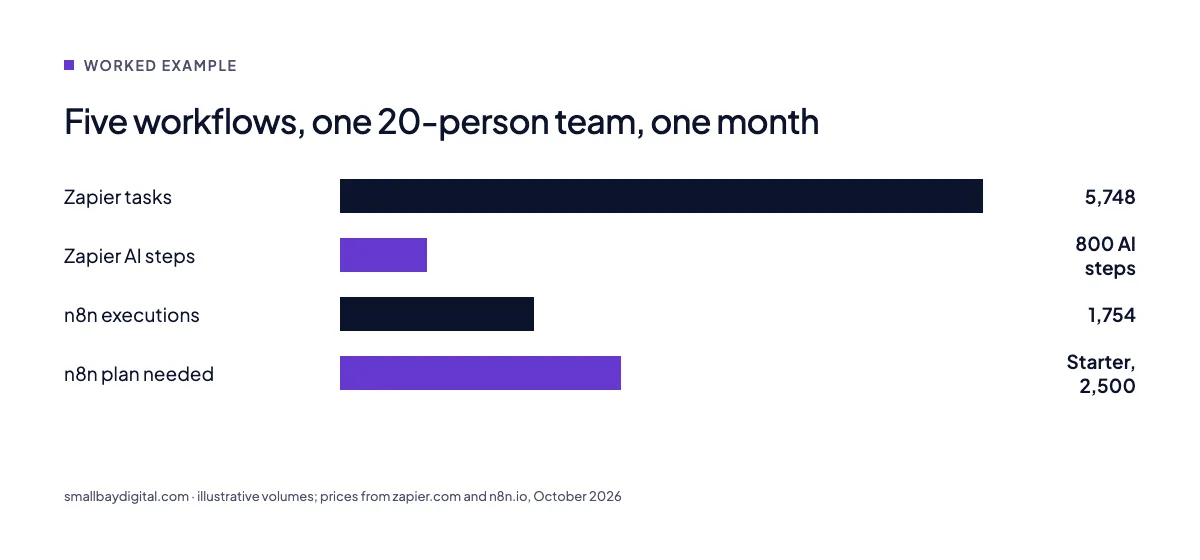
| Lead routing with one AI qualification step | 300 | 5 | 1,500 plus 300 AI steps | 300 |
| Invoice creation and reminder | 150 | 4 | 600 | 150 |
| Support triage with AI classification | 500 | 4 | 2,000 plus 500 AI steps | 500 |
| Status sync CRM to billing | 800 | 2 | 1,600 | 800 |
| Weekly report | 4 | 12 | 48 | 4 |
| Total | 5,748 tasks plus 800 AI steps | 1,754 executions |
On Zapier that is a Team plan in the 5,000 to 10,000 task tier before the AI step rates, so roughly $150 to $250 a month depending on tier and model. On n8n cloud it fits inside Starter at €20 a month, with room to triple.
The numbers are illustrative, your volumes will differ, and we have left out the cost of the person maintaining either tool. But the shape holds for every client bill we have looked at this year: Zapier charges per step and per AI call, n8n charges per run.
The rule Zapier itself now gives
On 13 October 2026 Zapier posted a three-step recommendation: start with AI to work out the job, move the steps that repeat into deterministic automation because it uses fewer tokens over time, and keep AI only in the parts that need judgement.
That is good advice and it is also the cheapest way to run Zapier. Most “AI steps” we find in audits are doing something a rule could do: mapping a status, formatting a date, picking a template. Each one is a model-tier charge for work that costs nothing as a filter.
What we do with a client’s Zapier account
- Export every Zap with its run count. Most accounts have a third that have not fired in ninety days.
- Replace AI steps that make no judgement with filters, formatters or lookups.
- Move the high-volume, multi-step workflows to n8n, where the per-run pricing fits.
- Keep Zapier for the long tail: low-volume Zaps where its app library saves a day of integration work.
Most teams end up on both, with both bills lower. This is the usual shape of a modernise engagement.
Questions we get asked
Is n8n harder to use than Zapier?
Yes, somewhat. Zapier is built for people who will never see a JSON object. n8n expects you to look at the data. For a team with no technical person, Zapier’s ease is worth real money. For a team with one, n8n’s pricing is worth more.
Should we self-host n8n?
Not under about 10,000 executions a month. The person maintaining the server costs far more than the server. Cloud Starter or Pro covers most teams of 1 to 50.
What about Zapier Agents?
Fine for a person automating their own work. For a business process that runs hundreds of times a day, the activity billing adds up fast and the permission model is thin. We build those agents on n8n or in code, with the permission rules we use everywhere.
Sources and further reading
- Zapier pricing, read 20 October 2026
- n8n pricing, read 20 October 2026
- Zapier on X: start with AI, move repeated steps to deterministic automation, 13 October 2026
- Gergely Orosz on his brittle $200-a-year Zapier integration, X
- n8n pricing 2026: cloud, self-hosted and real costs, Lowcode Agency
- Zapier says I’m over my 100-task limit after using 25 tasks, Zapier community