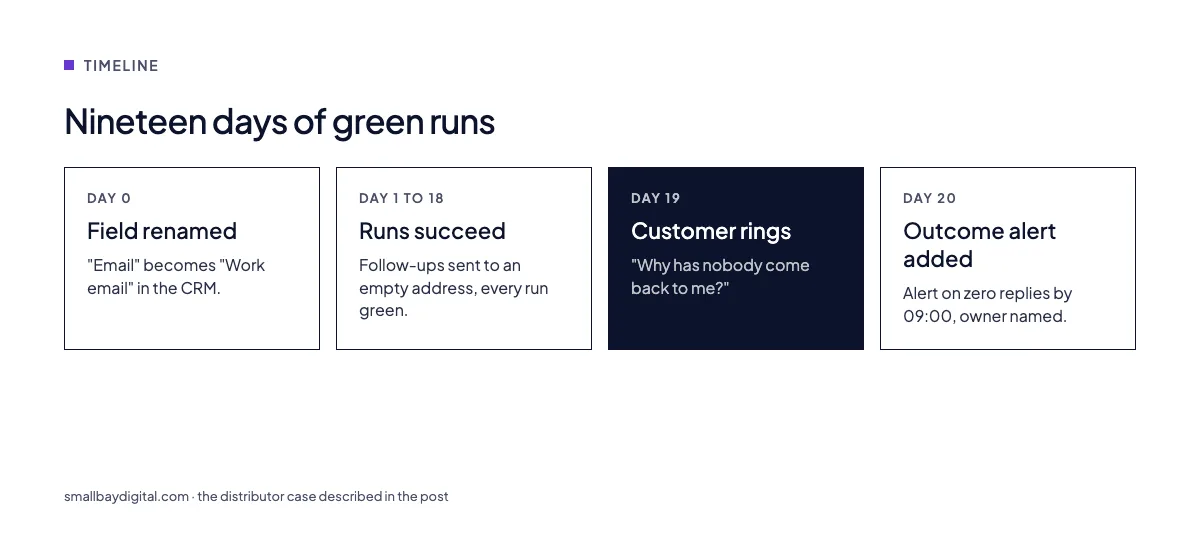
A distributor we work with found out their quote follow-up had been off for nineteen days. Not from a dashboard. From a customer who rang to ask why nobody had come back to them.
The workflow had not errored. The Zap was still on. The run history was green. A field upstream had been renamed from “Email” to “Work email”, the lookup returned nothing, and the follow-up step sent nineteen days of emails to an empty address, successfully.
The short answer
Automation platforms report whether a run executed, not whether it did the job. A workflow can succeed on every run and still do nothing useful. The only reliable signal is the outcome: leads replied to, invoices posted, orders shipped. Monitor the number the workflow exists to move, alert when it goes quiet, and put a named person on the alert.
Why green means nothing
In n8n, the word “active” on a workflow means one thing: the trigger is armed. It does not mean the last run did anything. A developer on DEV Community described a lead-scoring workflow that scored every lead as zero for six weeks because one field came back undefined. Every run counted as a success.
Zapier has its own version. A step that errors repeatedly will pause the Zap. The pause is correct behaviour, but it creates a new silent state: a paused Zap that nobody knows is paused. Failure emails exist, and in our experience they are usually off, or go to the inbox of the person who built the Zap in 2023 and has since left.
The n8n community has a thread titled, simply, “When a workflow quietly stopped in your own business, who noticed first?” The answers are the customer, the accountant at month end, or nobody.
What silence costs
The cost is never the run. It is the gap.
- A follow-up that stops for three weeks is three weeks of leads that went cold. For a team closing one deal in ten, that is a deal.
- An invoice sync that stops is cash that arrives a month late, and a finance person reconciling by hand to find out why.
- A stock sync that stops is an oversell, a refund and a one-star review.
The pattern we see in audits is the same every time: the business did not lose money the day the workflow broke. It lost money every day until someone noticed, and the noticing is the expensive part.
The four checks we put on every build
1. Outcome count, not run count
Every workflow has a number it exists to move. New leads with a reply. Invoices posted. Orders dispatched. We log that number, not the run, and we alert on it going quiet. “Lead follow-up ran 40 times today” is noise. “Zero leads replied to since 09:00, normally 12 by now” is the alert.
2. A dead-man switch
If a scheduled workflow has not reported in by the time it should have, that is itself an alert. Nothing has to error. Silence is the trigger. On n8n this is a second tiny workflow that checks the first one’s last run time. On Zapier it is a scheduled Zap that reads a timestamp from a sheet or a table.
3. Field contracts
Most silent failures are a renamed field, a changed dropdown value, or a date in a new format. We validate the shape of the data at the start of the workflow and route anything unexpected to a review queue with the raw record attached. Undefined never gets to travel downstream.
4. A named owner, not a channel
Alerts into a busy Slack channel are alerts to nobody. Every workflow in our handover document has one owner by name, a backup, and what to do in the first ten minutes. That is written down before go-live, not after the first outage.
Before and after
| Before | After | |
|---|---|---|
| Signal | Run succeeded | Outcome moved |
| Who finds out | A customer, weeks later | The owner, within the hour |
| First action | Open the platform and scroll | Open the review queue, see the bad record |
| Typical gap | 2 to 6 weeks | Under a day |
What to do this week
- List every live automation with its owner and the number it exists to move. If you cannot name the number, that is a finding in itself.
- Turn on failure notifications in Zapier and add an error workflow in n8n. It is a ten-minute job and it catches the loud failures.
- For the three workflows that touch revenue, add an outcome count and an alert for silence.
- Put a name on each alert.
If you would rather we did it, the Automation Audit maps every live workflow, its owner and its failure modes in one to two weeks, and the monitoring above is part of every build.
Questions we get asked
Does Zapier or n8n tell you when a workflow fails?
Both can tell you about a loud failure, an error, if notifications are set up. Neither tells you about a quiet one, where every run succeeds and the result is wrong or empty. That needs an outcome check you add yourself.
How much monitoring is too much?
Alert on outcomes, not on runs. One alert per workflow for “went quiet” and one for “unexpected data” is usually enough. More than that and people stop reading them.
We have forty automations. Where do we start?
With the ones that touch money: lead follow-up, invoicing, order status. Monitor those three properly before touching the rest.
Sources and further reading
- Your n8n workflow stopped three days ago. Nobody noticed., DEV Community
- The n8n workflow that broke silently for six weeks, DEV Community
- The silent failure: when your n8n workflow succeeds but does nothing, n8n community
- When a workflow quietly stopped in your own business, who noticed first?, n8n community, October 2026
- How do you handle failures in complex multi-step automation workflows?, Zapier community
- Order and dispatch management system, the SBD build where status alerts go to five kinds of stakeholder