Forms
Typeform integration consultant: responses that land in the right place
SBD connects Typeform to your CRM, base and messaging tools so each response is checked, deduplicated, routed to an owner and followed up, with signed webhooks and nothing lost when a receiver is down, for teams of 1 to 1,000 people. Workflow automation builds start at $1,000, with the fixed price set after a $500 Automation Audit that is credited to the build.
- Tool
- typeform.com
- Usually paired with
- HubSpot, Airtable, Slack, WhatsApp Business API
- Timeline
- Most builds live in 2 to 8 weeks
- Owned by
- You, with accounts, credentials and code in your name.
What we build on Typeform
- Route and qualify responses before a person sees them
- Deduplicate and enrich against the CRM
- Start follow-up sequences from answers
- Report on responses without exports
What we sync
Workflows we are asked for
- Typeform lead to CRM with scoring
- Typeform survey results to a dashboard
- Typeform to WhatsApp follow-up
- Typeform applications to a review queue
Tools Typeform usually needs to talk to
-

Typeform and HubSpot
The CRM and marketing platform most B2B teams of 10 to 1,000 run on.
-

Typeform and Airtable
A relational database with a spreadsheet face, used as the operations base for teams who have outgrown sheets.
-

Typeform and Slack
Team chat, and usually the place where alerts get read.
-

Typeform and WhatsApp Business API
The channel customers in most markets reply on, with templates, sessions and consent rules.
What a Typeform integration from SBD does
Typeform is good at getting people to finish a form.
What happens after submit is usually the weak point: responses land in a sheet or an inbox, duplicates pile up in the CRM, and the best leads wait for someone to notice them.
We build four kinds of thing. Lead capture: a response becomes a CRM contact and deal, matched against existing records by email and company so returning leads update rather than duplicate. Qualification: answers scored by rules, or by a model where answers are free text, with the owner alerted and the score explained. Follow-up: a welcome email or WhatsApp message with a booking link, and a chaser if nobody books. Reporting: survey and application results summarised in a dashboard instead of exported.
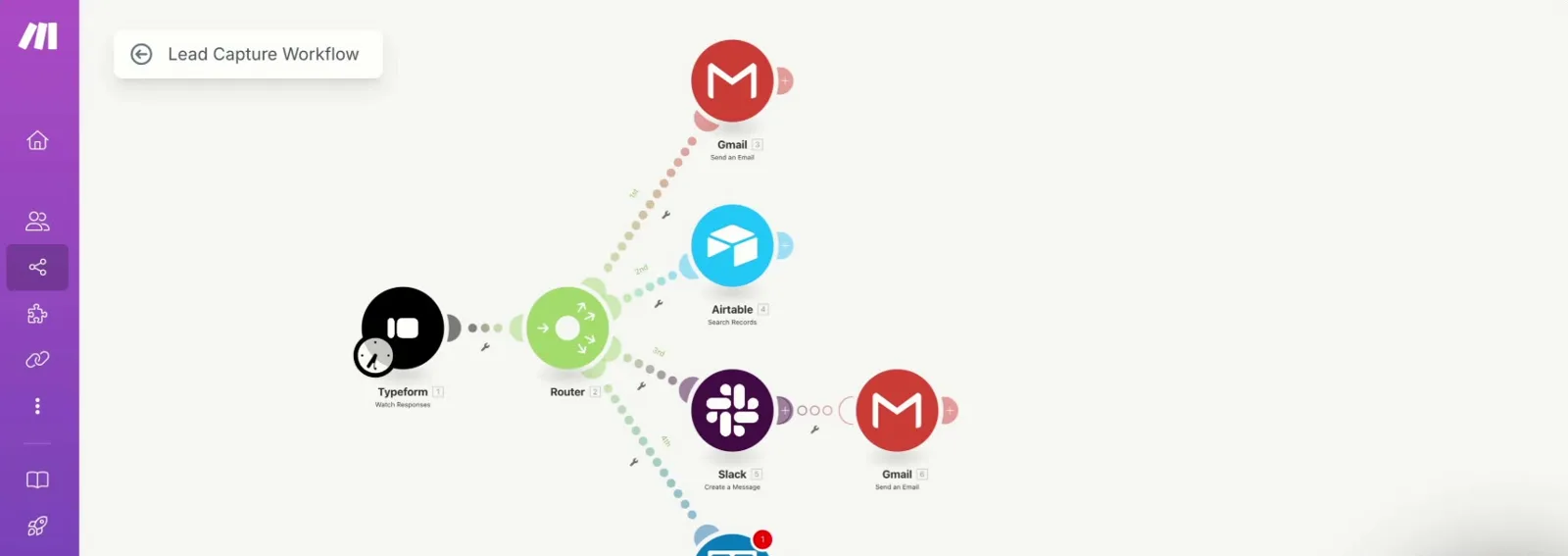
Our lead capture concept for a marketing agency shows the pattern: a Typeform submission sends a welcome email with a booking link, adds or updates the lead in Airtable, posts to Slack and opens a Trello card, and a second Make scenario follows up if no call is booked within 48 hours. It was built as a proposal and is not a live client system.
When Typeform's own integrations are enough
Typeform has native integrations with common CRMs, sheets and email tools, and for "put each response in a row" they are enough.
A custom workflow earns its cost when:
- Responses must be matched against existing contacts and companies before anything new is created.
- Routing depends on several answers combined, or on data from outside the form such as account status.
- Free-text answers need a model to classify them before a person sees them.
- You need a record that every response was received and processed, with alerts when one is not.
Typeform API limits, signed webhooks and retries
Typeform's developer documentation, read in October 2026, limits the Create and Responses APIs to two requests a second per Typeform account
That is plenty for live webhooks but slow for a backfill of thousands of responses, so we page through history slowly and out of hours. Accounts that store responses in Typeform's EU data centre use a different base URL, api.eu.typeform.com or api.typeform.eu, and an integration pointed at the default address will not find their data.
Webhooks are the main route in
Typeform signs each one with a Typeform-Signature header, an HMAC SHA-256 of the raw payload keyed with your webhook secret, base64 encoded and prefixed sha256=. Our receivers reject anything that does not verify. Typeform waits 30 seconds for a response. On 429, 408, 503 or 423 it retries every two to three minutes for 10 hours; on other errors it retries with back-off; on 404 or 410 it disables the webhook immediately. It also disables webhooks that fail every time across more than 300 attempts in 24 hours, or 100 attempts in five minutes.
So a receiver that is down for an afternoon is recoverable, but a misconfigured URL that returns 404 switches the webhook off on the first response
We alert on webhook failures, check webhook status daily, and run a nightly reconciliation that compares response counts from the API with what reached the CRM.
Hidden fields, response limits and plan choice
- 01
Hidden fields are the most useful thing in a Typeform integration.
Passing a contact ID, campaign or source in the form URL means the response arrives already linked, with no guessing by email. We set hidden fields on every form link that comes from a known source. When an email campaign links to a form, the contact ID goes in the link, so a respondent who types a different email address is still matched to the right record, and the campaign is credited with the response.
- 02
Response limits are set by plan.
Typeform's pricing page in October 2026 lists Basic at $28 a month billed annually for 100 responses a month, Plus at $56 for 1,000 and Business at $91 for 10,000, with Enterprise priced on request and HIPAA, SSO and the EU data centre listed as Enterprise features. A lead form that grows past its plan stops being useful at the worst moment, so we check volumes during the audit.
Scoring, routing and follow-up rules you can read
Lead qualification only works if sales believes the score.
We write scoring rules from the answers that predict a good customer, agreed with whoever owns the pipeline, and show the reason next to every score. Where answers are free text, a model classifies them into the same categories and gives its reason, and uncertain cases go to a person.
Routing follows rules written down in one place: by territory, service or deal size, with a fallback owner so no lead is unassigned. Each new lead gets a response time target, and if the owner has not acted by then, the lead is escalated. Leads that do not qualify still receive a polite reply and, where they agreed to it, join a nurture list rather than disappearing.
Duplicate matching runs in a fixed order, exact email first, then company domain with name, and anything ambiguous is flagged rather than merged.
Consent is captured in the form itself. If a respondent ticks a box to receive marketing, that answer is written to the CRM's consent field with the date and the form it came from. If they do not, the workflow sends only the reply they asked for. This keeps marketing lists clean and gives you a record if anyone asks how they were added.
How a Typeform engagement with SBD works
- Step 1$500Automation AuditCredited to the build
- Step 2from$1,000Workflow automationFixed after the audit
- Step 3from$3,000Internal toolsFixed after the audit
- Step 4from$50Care planA month, after sixty days of hypercare
Every engagement starts with an Automation Audit at $500, credited in full to your build. We review your forms, hidden fields, where responses go now, how duplicates arise and how quickly leads are contacted.
Workflow automation builds start at $1,000, internal tools at $3,000 and multi-module systems at $5,000. Work runs in two-week sprints with sixty days of hypercare, and care plans start at $50 a month. See the pricing page. You pay Typeform directly; we do not resell licences.
What you own when we finish
Everything below is in your name when the build ends.
- The Typeform account, webhook secrets, the workflow platform and the CRM are in your name.
- You receive a map of each form, its hidden fields, where its responses go and how duplicates are matched, plus a runbook for disabled webhooks and failed syncs.
- Your team can change questions; changes to hidden fields or answer options that drive routing come back through review, because they can break the mapping.
Typeform at enterprise scale
Typeform is used by marketing, recruitment, research and customer experience teams for lead capture, applications, surveys and feedback. In larger organisations several teams own their own forms in one account, and the forms feed a CRM, an applicant tracking system or a data warehouse.
Single sign-on and compliance
Typeform lists SSO, HIPAA and the EU data centre on Enterprise. We confirm which apply, and point integrations at the correct regional API address.
No lost responses
Signed webhooks feed a queue, failures alert at once, and a nightly reconciliation compares API counts with what reached the CRM, so a disabled webhook is caught within a day.
Clean CRM data
Hidden fields carry known IDs, and responses are matched to existing contacts and companies before anything is created, with the matching rules written down.
Form governance
We document which fields drive routing and which systems depend on them, so form owners know what they can change freely and what needs a review.
Personal data handling
Responses are stored in the systems that need them, retention is agreed, and sensitive answers are not copied into chat tools or alerts.
Engagements we take on
Already on Typeform, duplicates in the CRM
Every response creates a new contact. We add matching on email and company, merge existing duplicates and pass known IDs in hidden fields from here on.
Already on Typeform, good leads waiting days
We score responses on arrival, alert the right owner with the reason, send a booking link at once and follow up if nobody books.
Already on Typeform, many teams and no overview
We map every live form, its owner and destination, retire dead ones and set one pattern for how responses reach your systems.
Read next
Sources
- Typeform Developers, Get started (API rate limits, EU data centre base URL), checked 29 October 2026
- Typeform Developers, Secure your webhooks (Typeform-Signature, HMAC SHA-256), checked 29 October 2026
- Typeform Developers, Webhooks (timeout, retries, automatic disabling), checked 29 October 2026
- Typeform, Pricing page (plans, responses a month, Enterprise features), checked 29 October 2026
Standards on every build
Validation, retries, reconciliation, audit logs and alerts come as standard, with credentials and accounts in your name. Read the integration standards
What people ask about Typeform
Can the follow-up depend on answers?
Yes. Answers drive routing, owner, template and timing, with the logic kept in one place rather than spread across form rules.
Start with the one Typeform workflow your team still runs by hand
Bring it to a discovery call. You leave with a yes or no on fit, an outline of the build and what we would do first.
Book the call