




















Operations & Internal Tools
Connect Mailgun and Retool
Emailed requests become records your team can check and act on, in one internal tool.
- Data flows
- 4 automated, two-way where safe
- Built with
- Mailgun, Retool, OpenAI
- Timeline
- Live in 3 to 5 business days from scope
- Owned by
- You, with accounts, credentials and code in your name.
In short
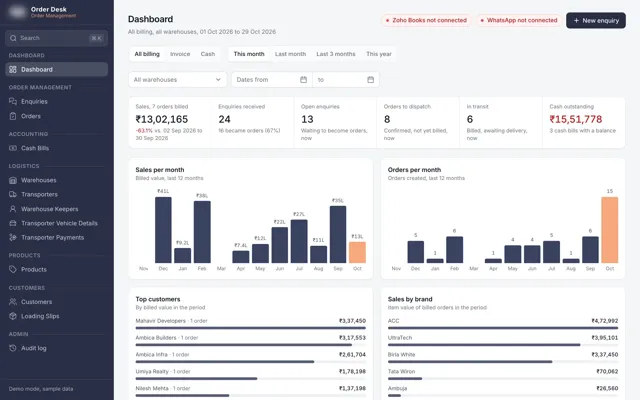
Connecting Mailgun to Retool turns inbound email into records in an internal tool, so staff check and act on them without retyping. SBD built an enquiry platform for an industrial distributor that reads emailed RFQs with AI and matches parts against the SAP item master, with Mailgun and Retool in the stack.
The workflows
What runs between Mailgun and Retool.
Each line is one automated workflow. It shows the event in one tool, the checks and mapping in between, the action in the other tool and who is notified.
-
RFQs read from email
-
Purchase orders turned into records
-
Supplier invoices captured
-
Attachments stored against each record
Every record passes through the same stages
- 1Receive
Webhook or polling from the source tool, with a signed payload and a replay log.
- 2Validate
We check required fields, types and the record key. Anything that fails goes to the review queue.
- 3Map
Fields are mapped to the destination schema, with dropdown values, currencies and dates normalised.
- 4Upsert
Each write is matched on the record key, so a retry updates the existing record.
- 5Confirm
The outcome is logged, an alert fires if the count stops moving, and a reconciliation runs each night.
Read this first
Where the simple setup breaks down.
A one-step Zap connects Mailgun and Retool in an afternoon. This is what tends to go wrong once volume grows and edge cases appear.
Retool does not receive email on its own
A Retool app needs something in front of it to accept the message. Mailgun receives it and posts to an endpoint, which must store the data first, because a failed write would otherwise lose the email.
The useful part is often in the attachment
RFQs and purchase orders commonly arrive as PDFs or spreadsheets. An email body alone misses the data, so attachments have to be stored against the record and read separately.
The same request arrives more than once
Customers forward, reply and resend. Without a check on message IDs and thread content, one enquiry becomes three and staff quote it twice.
An AI reading has to be checkable
If the app shows only the extracted fields, nobody can tell when the AI misread a part number. Keeping the original email beside the result, with a queue for uncertain matches, is what makes staff trust it.
What we wire up
The data flows.
- 01 When
An email reaches the inbound address
ThenVerify the Mailgun signature, store the message and attachments, and create a record
- 02 When
A record is created
ThenExtract the requested items with AI and score its confidence
- 03 When
Items are extracted
ThenMatch them to your item master and show them in Retool
- 04 When
A match is uncertain or the email cannot be read
ThenSend it to a review queue with a named owner and the original attached
Used for
- RFQs read from email
- Purchase orders turned into records
- Supplier invoices captured
- Attachments stored against each record
- Mailgun inbound routes to Retool
- AI extraction with human review
- Part number matching
- Review queues in Retool
- Email to internal tool workflows
- Duplicate enquiry detection
Built with
In every build
What every integration build includes.
Under the hood
- Upserts keyed on the record
Each write is matched on the source ID, so a retry or a re-fired event updates the existing record.
- Retries with backoff
Rate limits and timeouts are retried with increasing delays. If they still fail, they are parked for review.
- Idempotent, loop-safe writes
Two-way flows carry a marker so a change written by the sync does not re-trigger the sync.
- Reconciliation
A nightly job compares counts and totals on both sides and lists any record that differs.
- Audit log
Each run records the input, the mapping result, the action taken and what triggered it. You can search it by record.
- Error monitoring
Failed runs raise an alert. An outcome count also alerts when it stops moving, which catches failures that throw no error.
- Review queue
Records the sync is not sure about land in a screen a person can read, correct and release.
- Scoped credentials
Each connection has its own credential, limited to the objects it needs and stored encrypted in your account.
For the team
- Slack or email notifications
Alerts go to a named person on your team, by Slack, email or WhatsApp.
- A runbook
One document per integration: what it does, what each alert means, and what to do in the first ten minutes.
- Training
A live session with the people who will use the review queue, recorded for whoever joins later.
- Handover
Admin access, billing and code sit in accounts in your name from the start, so the build keeps running if we stop working together.
- Sixty days of hypercare
The engineers who built it stay on call after go-live, fix what breaks and tune what the team asks for.
- A monthly report
One page in plain language covering runs, records synced, exceptions handled and what changed.
Security and your data
Where the data goes, and who holds the keys.
- Accounts
- Every platform account is created in your name. We work through managed access you can revoke.
- Credentials
- Stored encrypted in the orchestration layer, scoped per connection and rotated at handover.
- Data in transit
- All traffic uses TLS, and webhooks are checked by signature before anything is processed.
- Data at rest
- We store only what the sync needs and keep no copies of your customer data on our machines.
- AI steps
- Where an integration uses a model, it is through a business API that does not train on your data.
- Retention
- Run logs are kept 90 days by default, which you can change. Card and ID numbers are redacted from payloads.
- Agreements
- DPA and NDA on request. Regional rules covered in our privacy policy.
Keys and sensitive data
How API keys, tokens and personal data are handled.
- Keys are kept in a vault
API keys and tokens are stored in the orchestration layer's encrypted credential store or the platform's secret manager. None are written into workflows, repos, spreadsheets or chat.
- One credential per connection
Each integration gets its own key, scoped to the objects and actions it needs. A lead sync cannot read invoices. Revoking one key stops one thing.
- Service accounts for connections
Connections use a dedicated service user in your account, so nothing breaks when a person leaves and nothing runs under someone's name.
- Two-factor on every account
Each platform account we set up has two-factor authentication on, and the recovery codes are handed to you.
- Rotation on handover and on request
Keys are rotated when the build is handed over, when anyone with access leaves, and at any time you ask.
- Secrets are redacted from logs
Audit logs redact tokens, card numbers, government IDs and anything you flag as sensitive before a line is written.
- Webhooks verified before processing
Inbound calls are checked against the sending tool's signature. Unsigned or stale payloads are dropped and counted.
- Access you can see and revoke
Our access is through managed roles in your accounts. You can see it, limit it or remove it without touching the build.
Engineering decisions
Decisions we make before writing the first workflow.
- Rate limits and backoff
Each API has a ceiling, so calls are batched, queued and retried with increasing delays during busy periods.
- Backfill and pagination
The first run loads history as well as new events. Backfills page through the source in order and resume after an interruption without writing a record twice.
- Out-of-order and duplicate events
Webhooks can arrive twice or out of sequence. Each event carries a version or timestamp, so an older version cannot overwrite a newer one.
- Schema changes
A renamed field or a new dropdown value is a common cause of silent failure. Payloads are checked against a contract, and a mismatch stops the run and raises a flag.
- Time zones, currencies, units
Dates are stored in UTC and shown in local time. Amounts carry their currency and quantities their unit, and conversions happen once, in the map step.
- Sandbox first
Builds run against sandbox or test accounts with seeded data first. Going live means switching credentials.
- Versioned and reversible
Workflows and code are version-controlled. A release can be rolled back in minutes without losing the records processed since.
- API deprecations watched
Tools retire API versions on a schedule. We track the dates for every connection in the runbook and upgrade before the cut-off.
- Cost per run known
Each run logs its cost, including any model calls, so you can see spend as it builds up.
- Run metrics
We chart runs per hour, records in and out, exception rate and latency, which often shows a problem before an alert fires.
Proof
Where we have done this.
The offer
Hire SBD to connect Mailgun and Retool.
We agree a fixed scope in a discovery call and go live in three to five business days. The accounts are in your name, and the engineers who built it stay on call for sixty days after.
- ScopeOne call to agree the flows, the fields and the owner, written up the same day.
- Build4 workflows, the data map above, validation, upserts, retries and reconciliation.
- Go-liveWe test in a sandbox first, then switch over. Day three to five from scope for most pairs; longer only if a tool needs approval, such as WhatsApp templates.
- HandoverRunbook, training session, alerts to a named owner, admin access and code in your accounts.
- AfterSixty days of hypercare, then a care plan or run it yourself.
Questions
What people ask about this pair.
Do we have to change our email address?
Usually not. You can forward an existing address such as sales@ to the inbound address, so customers keep writing to the one they know.
Will the AI make mistakes?
Yes, sometimes, especially with part numbers written in many forms. Uncertain results go to a person, and the original email sits beside the result so checking is quick.
Can this work with something other than Retool?
Yes. Mailgun only needs an endpoint to post to. Retool suits an internal review screen, and the same intake can feed another app.
Related
-

Airtable and Retool
Airtable is a good database with a limited interface. Retool adds the screens and permissions it lacks.
-

Retool and Supabase
Screens in Retool, data in a Postgres database you own and can expose safely.
-

Supabase and Resend
Each email sent once from your own domain, with the delivery record stored.
- Solution
Sales and RevOps
The workflows we automate for this kind of team.
Mailgun and Retool
Connect Mailgun and Retool
Emailed requests become records your team can check and act on, in one internal tool.
Start with a discovery call